


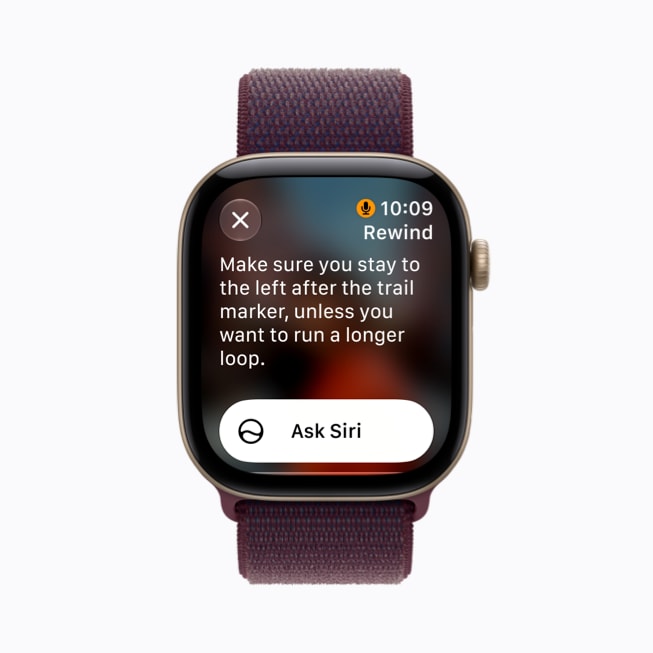
No. Apple Watch Live Rewind does not record audio, according to Apple. Apple says its Audio Intelligence features don't create audio recordings. Live Rewind shows what was said in the last 15 seconds as a short text snippet on your wrist, and there's no playback.
Apple Watch Live Rewind is a new Apple Watch feature that shows you, as text, what was said around you in the last 15 seconds. You double-press the Digital Crown and a short transcript appears on your wrist. It is part of Apple's Audio Intelligence features for Apple Watch Series 12 and Apple Watch Ultra 4, and Apple says it will arrive in beta late in 2026, in English first.
Image: Apple
What Live Rewind does
Apple's support page describes it in one line: "Live Rewind recalls what was just said in the last 15 seconds by showing a text snippet on your Apple Watch when you double-press the Digital Crown." Apple's own example on the Series 12 product page is a loud restaurant, or cooking instructions you didn't quite catch.
Once the snippet is on screen, Apple says: "You can ask Siri about the content of the snippet or simply save it to the Siri app." If you don't save it, the text doesn't hang around. In Apple's words, "Live Rewind 15-second text snippets disappear permanently from your Apple Watch approximately 30 seconds after the Apple Watch display dims."
Live Rewind sits alongside Siri Recap, Sound Recognition and faster Shazam under the Audio Intelligence name. We covered the longer-form sibling in What Is Siri Recap?, so this post sticks to Live Rewind.
How it works
Apple announced Live Rewind on 9 September 2026 alongside Apple Watch Series 12. According to Apple's support page, "Raw audio is never accessible. Audio flows into a protected buffer inside the S11 chip's Secure Exclave." Processing happens on the device, and the watch turns the last 15 seconds into text only when you ask for it with a deliberate press.
Apple also built in a clear signal to the people around you. The support page says: "When activated, an audible chime plays from the speaker on your Apple Watch, even if your Apple Watch is on silent." MacRumors reported that the chime plays even with headphones connected, and Engadget described a full-screen animation and microphone indicator as well. That is a thoughtful design choice: anyone nearby knows the feature was used.
What Apple says about audio and privacy
Apple's statement on audio is direct: "Audio Intelligence features don't create audio recordings. No audio can be accessed by the operating system, apps, you, or even Apple." There's no playback. What you get is text, briefly, on your wrist.
Apple also sets age rules. The support page says users under 13 can't use the feature, and users under 18 on a Child Account need approval from a parent or guardian.
Requirements, price and availability
| Item | What Apple says |
|---|---|
| Apple Watch | Apple Watch Series 12 or Apple Watch Ultra 4 |
| iPhone | Apple Intelligence-enabled iPhone 16 or later, excluding iPhone 16e |
| Software | Apple Intelligence and Siri AI (Beta) |
| Window | The last 15 seconds, shown as text |
| How to trigger | Double-press the Digital Crown |
| Languages | "Available in English with more languages to follow" |
| Timing | Beta late in 2026; not initially available in the EU |
| Price (US) | Series 12 from $399; Ultra 4 from $799 |
The watches themselves are already out. Apple's newsroom says Series 12 went on sale in stores on Friday, 18 September 2026. Live Rewind comes later as a software beta, so a new watch today won't have it on day one. Apple's support page puts it this way: "Live Rewind and Siri Recap will be available in beta later this year, starting with English."
Who Live Rewind is great for
- Noisy places. Restaurants, stations, busy kitchens: the exact moments Apple uses as examples.
- Quick instructions. A gate number, a room number, a step in a recipe that went by too fast.
- People who drift for a moment. If your attention slips mid-sentence, you can catch up without asking someone to repeat themselves.
- Apple Watch owners who want nothing extra. If you already wear a Series 12 or Ultra 4, it's built in, with no new device to charge.
Live Rewind vs an always-on AI memory pendant
These solve different problems. Live Rewind covers a short window you trigger: the last 15 seconds, on your wrist, and then it's gone unless you save it. An always-on AI memory pendant like Legend One covers the whole day. It turns speech into text as it's spoken, with nothing to press, and you review transcripts, summaries and to-dos later in an app.
| Apple Watch Live Rewind | Legend One | |
|---|---|---|
| What it covers | Last 15 seconds, on demand | The whole day, always on |
| How you start it | Double-press the Digital Crown | Nothing to press |
| Audio | Apple says no audio recordings are created | No audio kept in your account; no playback |
| What you keep | Snippet disappears unless saved to the Siri app | Transcripts, daily summaries, auto to-dos, search |
| Languages | English to start | 150+ languages |
| Hardware | Series 12 (from $399) or Ultra 4 (from $799) plus iPhone 16 or later | Pendant plus companion app; $499 including first year of membership |
Where Apple wins is clear. If you wear an Apple Watch all day, Live Rewind is right there, it's fast, and the chime makes its use obvious to everyone nearby. For the "what did they just say?" moment, it's hard to beat. For a longer look at Apple's approach against a wearable, see Siri Recap vs an AI Memory Pendant, and for meetings, Siri Recap vs Granola. Our comparison page sets out ambient capture against press-to-record across devices.
FAQ
Does Live Rewind record audio?
No, according to Apple. Its support page says: "Audio Intelligence features don't create audio recordings. No audio can be accessed by the operating system, apps, you, or even Apple." What you see is a short text snippet on the watch.
Which Apple Watch do I need for Live Rewind?
Apple Watch Series 12 or Apple Watch Ultra 4, paired with an Apple Intelligence-enabled iPhone 16 or later (not iPhone 16e). Apple lists Series 12 from $399 and Ultra 4 from $799 in the US.
When is Live Rewind available?
Apple says Live Rewind and Siri Recap will be available in beta late in 2026, starting in English. Apple's product page says they will not initially be available in the EU.
Can someone use Live Rewind secretly?
Apple designed it not to be silent. When you activate it, an audible chime plays from the watch speaker even if the watch is on silent, and press coverage describes an on-screen animation and microphone indicator as well.
How is Live Rewind different from an AI memory pendant?
Live Rewind shows the last 15 seconds when you press the Digital Crown. An always-on pendant like Legend One captures the whole day as text without a press, then gives you transcripts, summaries and to-dos you can search later.
Where Legend fits
Legend One is built for the part of the problem Live Rewind doesn't try to cover: the whole day, not the last 15 seconds. It's an AI memory pendant made for people with ADHD, worn at chest height, always on, with nothing to press. It is not a medical device and does not treat ADHD. Legend turns your conversations into text. Audio is used only to create the transcript and isn't kept in your account. If your pendant is away from your phone, audio is held on the pendant until it syncs, then deleted. There's no audio to play back. If you want a day you can search rather than a moment you can catch, see how Legend works or the Legend One product page.
Sources: Apple Support, About Audio Intelligence features on Apple Watch Series 12 and Apple Watch Ultra 4; Apple Newsroom, Introducing Apple Watch Series 12 (9 September 2026); Apple Watch Series 12 product page; Apple Store pricing. Apple pages checked 21 September 2026. Press context: Engadget, Apple Watch's new Audio Intelligence enables a real-life conversation rewind (9 September 2026); MacRumors, You Can't Use Apple Watch's Live Rewind Secretly, Apple Says (10 September 2026).
Share:
Legend One vs Vibe Dot: Which Should You Buy in 2026?
Pebble Index 01 vs Sandbar Stream: Which Voice Ring Should You Buy?